Picture this: you’re in a quarterly planning meeting. The goal is clear - increase weekly active users by 20%. Someone opens a Confluence doc with forty-three feature ideas. The debate starts. The loudest voice wins 🗣️ Three months later you’ve shipped four features, moved the metric by 2%, and nobody can explain why. Sound familiar? That was my life before I came across the Opportunity-Solution Tree (OST). It’s a framework by Teresa Torres - if you haven’t read Continuous Discovery Habits yet, put it on the list - and the first time I saw it properly used, it felt like someone had finally turned the lights on 💡

What is it?

The Opportunity-Solution Tree is a visual tool that connects your desired outcome to the customer opportunities that could help you get there - and only then to the solutions worth building. It forces you to slow down at exactly the right moment: before you fall in love with a solution. The structure looks like this:
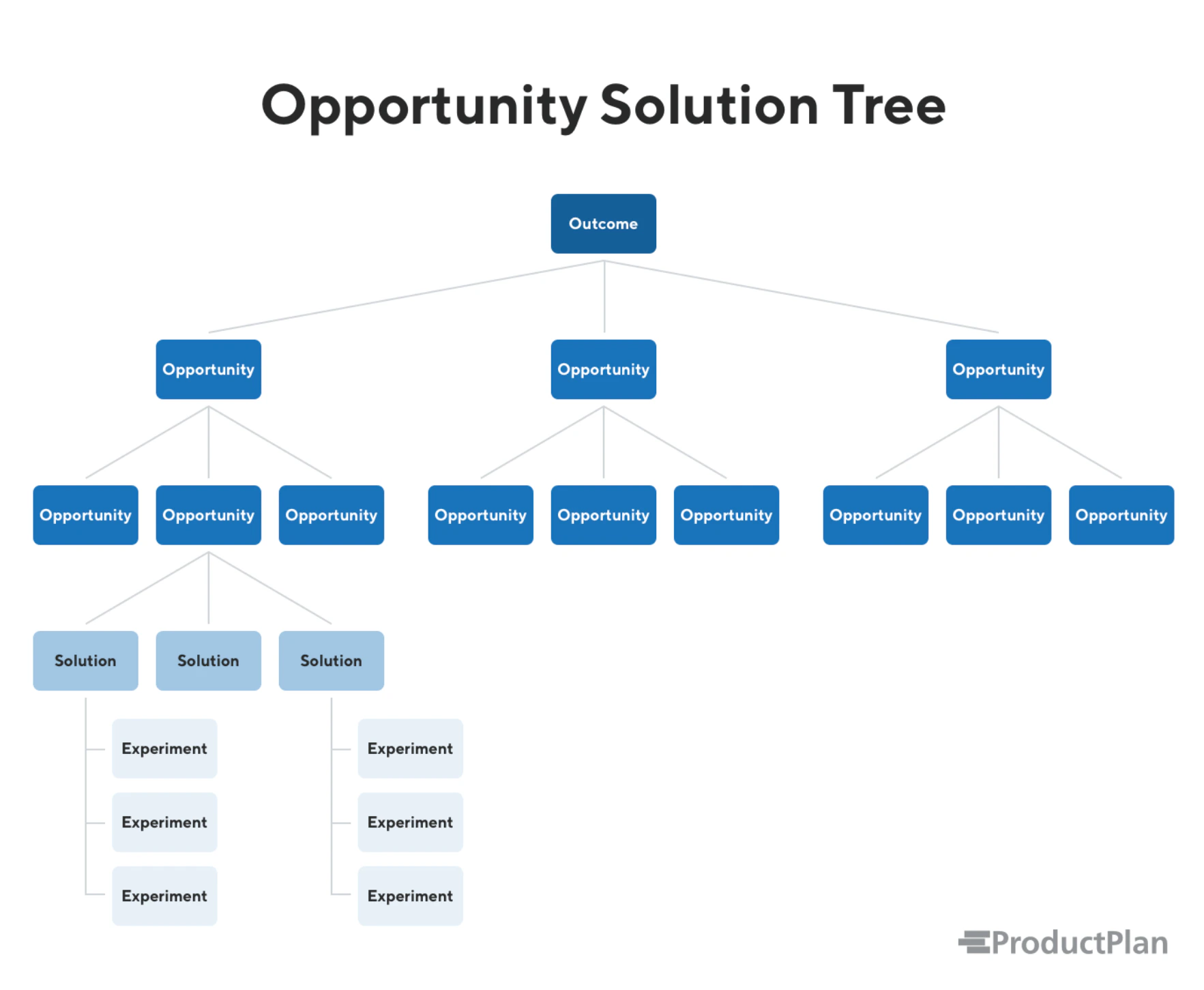
Opportunity-Solution Tree example
Four levels. Each one earns the next.

Walking through it

Level 1 - Desired outcome One thing. Not five. One measurable outcome your team is accountable for this quarter. “Increase weekly active users” or “reduce time-to-first-value for new signups”. If you can’t agree on the outcome, stop here - the rest of the tree won’t save you. Level 2 - Opportunities This is where most teams skip ahead, and it’s the most expensive mistake in product. Opportunities are customer needs, pain points, or desires - things you discover through research, not things you invent in a meeting room. Back to our WAU example. You go talk to users. You find out:
  • New users don’t understand what to do after signup (onboarding friction)
  • Power users can’t get their team to adopt the tool (collaboration gap)
  • Occasional users forget the product exists until they get a notification (habit formation)
Those are your opportunities. Three very different problems. Each worth a branch on the tree. Level 3 - Solutions Now you can ideate. For each opportunity, brainstorm multiple solutions - not just the first thing that comes to mind. The tree makes it obvious when you only have one solution per opportunity (a sign you’ve stopped thinking too early). For “onboarding friction” you might have: interactive product tour, a setup checklist, a guided first project template, a short welcome video. All on the table. None committed to yet. Level 4 - Experiments Before you build, you test. Small, fast experiments to validate whether your solution actually addresses the opportunity. A prototype, a fake door test, a concierge. The goal is to kill bad ideas cheaply.

Why it works

The tree does something simple but powerful: it makes your thinking visible. You can look at it and immediately see if you’re over-indexed on one opportunity, if you’ve skipped straight to solutions, or if your solutions don’t actually connect to any real customer need. It also makes prioritisation honest. Instead of arguing about which feature to build, you ask: which opportunity, if solved, would do the most for our outcome? Then you work from there. Lesson learned: the teams I’ve seen struggle with OST are usually the ones trying to build the tree in one meeting, from the top down, without any customer research. The tree is only as good as the opportunities in it - and those come from talking to people, not from brainstorming in a room.

Getting started

You don’t need special software. A whiteboard works. Miro and FigJam work. Even a Google Doc with nested bullets works (badly, but it works). Start with your outcome. Then go talk to five customers before you write a single opportunity. What you hear will surprise you - and that surprise is exactly the point. The rest of the discovery section digs into the tools that help you fill each level of the tree. If you’re not sure where to start, customer interviews are the fastest way to find real opportunities worth putting on the tree.